





tax advantage
Points of Interest and Features of Deductr Tax Software
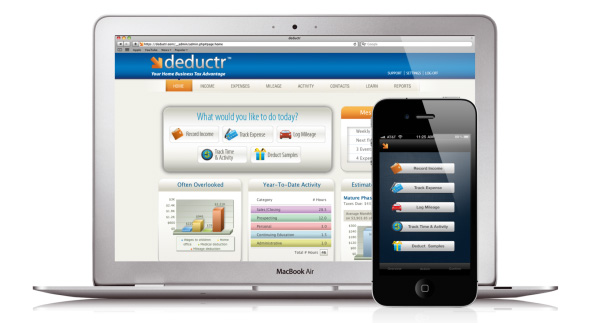
- Deductr is designed to simplify an essential business practice: tracking and recording business expenses. Every expense recorded in Deductr correlates with a legitimate deduction from your taxable income for the year. Tracking and logging every expense throughout the year can be a tedious and time consuming exercise -- not to mention easy to forget or worse, put off. The simplicity and ease of use Deductr provides takes the hassle out of tracking and in fact automates the entire process.
- Deductr tracks income, expenses, mileage, time and activity, and product samples you may give out.
- Deductr tracks the income from your business. Manually enter income or let MyBankLink track deposits made into your account. When you get paid through your business that income is recorded in Deductr. You can even record income from multiple businesses. Simply name each income stream with a unique category in Deductr. The year-end report will show each income stream under its unique category.
- Deductr tracks expenses. There are 3 ways to input expense information into Deductr.
Ways to input expenses into Deductr.
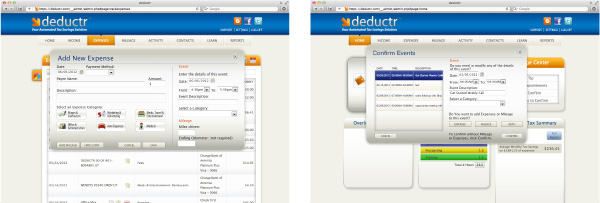
1st - Manually input info through any web browser on any computer or electronic device that has Internet access. Log into your Deductr account and click on any of the 5 quick link buttons on the home page under the heading "What would you like to do today?" Click Income, Track Expense, Log Mileage, Track Time & Activity, or Deduct Samples. Follow the simple steps to fill in the proper blanks and save. Your expense is now recorded in one of the 5 business logs in the top menu bar. You can access each expense to edit or delete it by going to the main menu and opening the logs. Mouse over the expense and 3 icons will appear to the right. A magnifying glass to see expense details, a pencil to edit, or an X to delete.
2nd - Through your iPhone or Android smart phone. Deductr apps are available at the Apple store and Android marketplace for free. Download the app on your phone. Log into Deductr and click on the Settings tab in the upper right corner of the page. In the fourth box down click the Update button in the Mobile Application box. You will see a mobile validation ID number and a box for a password. Create a password and click Save. Now go to your phone and open the app. It will prompt you to enter the Mobile Validation ID Number and the password you created. It will also ask you to create a PIN number. Once you do this the app with be activated and you can then do everything on your phone that you can do on your computer with Deductr.
3rd � Automatically input info using MyBankLink. MyBankLink automates tracking so you won’t have to remember to manually enter information at all!
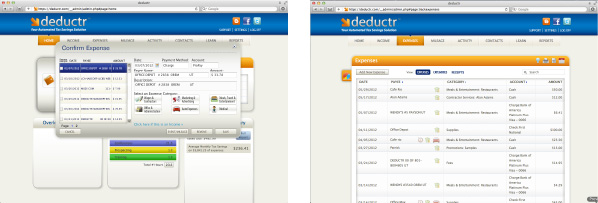
MyBankLink turns your bank debit or credit card into an automatic expense tracker. Linking your business bank accounts to Deductr guarantees every transaction gets logged into Deductr automatically. Whenever you swipe your card you’ll record that expense without thinking about it. It takes memory out of the picture and is the cure for even the worst procrastinator. Deductr notifies you via email or through your smart phone that you have transactions to confirm whenever a new transaction gets logged in Deductr. You then log in whenever you have time, confirm those legitimate business expenses, and remove any personal expenses that may have been logged through your account. That's it. Every transaction is then filed in a tax report that you can view anytime during the year to see where you stand when it comes to any taxes owed and more importantly your tax savings!
Deductr tracks mileage. Just like expenses, you can enter business mileage on your computer or on your phone. Deductr also has a GPS feature on the phone apps to track your miles for you as you drive.
Deductr tracks time and activity. This is a big one that most people don’t consider. The fact is, many small business owners are also part-time business owners hoping to grow their business into a full-time income. The IRS requires every business owner to do one thing; attempt to make a profit. That sounds simple but if the IRS doesn’t believe you are putting adequate time and activity into your business they won’t believe you are actually trying to create a profit and can designate your business a hobby! By using Deductr’s calendar and entering your appointments, meetings, calls, and other activities you will create a time and activity log that will legitimize your business as a real business and not a hobby! Don’t skip this important tracking feature.
Deductr tracks product samples. Many business owners sell products and it’s not uncommon to give samples to prospective customers. Those samples can be deducted dollar for dollar as long as you keep a good record of who got the sample, what it was worth, when it was given, and why. Deductr will prompt you for this information every time you record samples given.
Deductr helps you set up your business to correctly claim deductions for business use of the home, employing dependent children in your business, and working with 1099 contractors.
Deductr does something no other tool can do. With our patent pending calculating feature Deductr can tell you the true value of all expenses and deductions in real dollars and cents. The Estimated Tax Summary shows a two bar graph. The yellow bar reflects fixed business costs. The things you pay for every month in order to do business. The blue bar reflects the actual tax savings your business expenses and deductions are worth each month. So take the “Blue Bar Challenge” and see how fast and how high you can make the blue bar grow!
Deductr makes sure you are audit proof, providing everything the IRS needs in an organized and efficient manner. Your tax preparer or CPA will love the fact that they won’t have to dig through boxes of receipts and statements to help you get the most deductions allowed.
Deductr’s Learn Tab is you place for answers to Deductr features and how it’s best used, Tax Tips from a professional CPA, the ability to ask specific questions with Ask The Expert, and a complete FAQ list. We want to help you get the most out of your business when it comes to Taxes and saving you money.
Deductr provides 10 reports that are automatically updated as information is recorded in Deductr including the year-end tax report where everything is organized just as your tax preparer wants it. It doesn’t get any easier than Deductr.